This week
What changed in AI search and AEO, 13 to 20 November 2026
By Shubham Gururani, Founder, Opal AEO
Published · Facts checked · 4 min read
The short answer
Between 13 and 20 November 2026, ChatGPT, Google and Bing were each reported testing a different arrangement of AI answers and web links. Google also stopped showing which Gemini model runs AI Mode and added an AI button to image search. Most items are tests seen by a few people, so use them as signals.
The short version
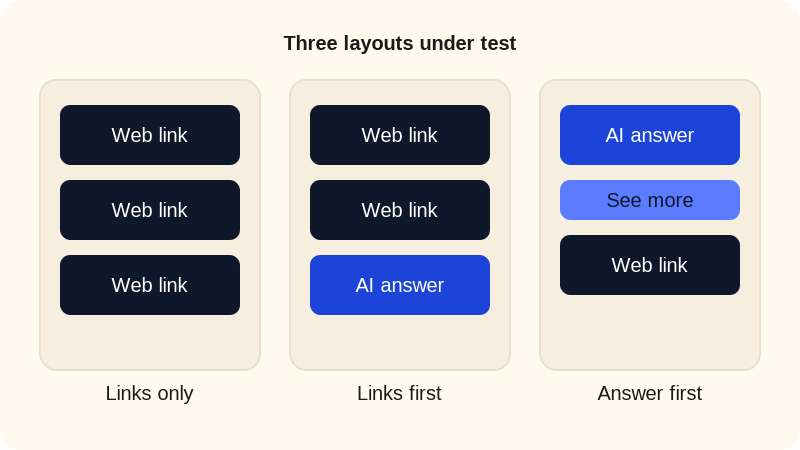
- ChatGPT is testing three result layouts, including web links only and an AI answer with a "See more" button.
- Google is testing removal of the AI Mode tab and the "Ask anything" box under AI Overviews.
- Bing is testing a "Web Mode" tab that hides AI answers.
- Google AI Mode no longer names the Gemini model it uses.
- Google Images has a Lens button that opens an AI follow-up.
Is ChatGPT changing how search results look?
ChatGPT is testing at least three search layouts, according to Search Engine Roundtable, which reported it on 16 November 2026. One shows only web results. One shows web results first and then the usual ChatGPT answer. One shows the AI answer at the top with a "See more" button, followed by web results, which the article says looks like Google's AI Overviews (the AI summary at the top of some Google results).
The reporter says he could not replicate any of these himself. Three people spotted them and shared screenshots on X.
Why it matters: in a web-only layout there is no AI answer in which a brand can be named. With a "See more" button, only the first part of the answer shows until someone clicks.
What to do: when you check a buyer question in ChatGPT, note which layout you saw.
Is Google removing AI Mode from search?
Google is testing removal of the AI Mode tab from the search tab bar and of the "Ask anything" follow-up box under AI Overviews, Search Engine Roundtable reported on 13 November 2026. AI Mode is Google's chat-style search experience.
Glenn Gabe spotted the change and posted screenshots on X. The reporter could not reproduce the missing tab, though he found a missing "Ask anything" box. The article carries no comment from Google. An update says some users are not getting AI Overviews at all, citing an X post of 19 November 2026.
Why it matters: a test is not a decision. Treat any single day's Google result as one sample of a surface that is being rearranged.
What to do: keep a dated note of whether AI Overviews and the AI Mode tab appeared when you ran a check.
Why did Google AI Mode drop the Gemini label?
Google AI Mode no longer shows which Gemini model it uses. Search Engine Roundtable reported on 16 November 2026 that the header now reads only "AI Mode". It says Rajan Patel, Google's VP of Engineering for Search, replied on X that this is intended and that Google is thinking about how to bring back a model indicator. We could not open the X posts, so this rests on the report.
The same article says Gemini 4 Carbon, which had been limited to Google AI Ultra subscribers, now appears for Google AI Pro subscribers.
Why it matters: subscribers on different plans can now get answers from different models, with no label saying so. That is one more reason the same question can give different answers.
What to do: record the plan (free, Pro or Ultra) next to every AI Mode answer you save.
Is Bing adding a Web Mode tab?
Bing is testing a tab called Web Mode that shows only web page results, with AI answers and Copilot content hidden, according to Search Engine Roundtable on 16 November 2026. Born City reported a Web tab beside Bing's AI mode on 14 November 2026, citing an unnamed industry report, and says Microsoft has not confirmed a launch date. The Search Engine Roundtable reporter says he could reproduce it in some browsers but does not think it is fully live.
This follows the two ways to hide Bing's AI answers that we covered in our digest of 13 November 2026.
Why it matters: a visitor who picks Web Mode never sees an AI answer, so only classic results count there.
What to do: check that your key pages still rank in plain web results, because some visitors choose to see only those.
What does the new Lens button in Google Images do?
Google Images now shows a Lens button that opens an AI Overview or an AI Mode follow-up about the image, Search Engine Roundtable reported on 19 November 2026. A user described an "AI MODE + LENS" icon in the Google app. When the reporter tried it outside the app, the button opened an AI Overview instead.
The article notes that Google keeps routing more features into AI Mode.
Why it matters: a shopper who starts with a picture can now continue in an AI conversation, so your product images may become a way into an AI answer.
What to do: search three of your product names in Google Images, tap the button and see what the AI says about them.
What to do this week
- Add four columns to your AI visibility log: date, assistant, plan and layout seen. Our guide to measuring AI visibility explains why one screenshot misleads.
- Run the same five buyer questions on three different days and compare the range, not one result.
- Search your brand in Bing with the web-only view when it is available, and confirm your key pages still appear.
- Try the Lens button on three of your product images and write down what the AI says.
- If you are new to the terms, read What is AEO? first.
Frequently asked questions
Are these changes live for everyone?
No. Three of the five are tests, and the Search Engine Roundtable reporter could not reproduce some of them himself, so only some people see them. The AI Mode label change was confirmed by a Google executive on X, according to that outlet. The Google Images button is reported working for some users, and it behaved differently inside and outside the Google app.
Does a test layout change whether my brand is named?
It can change where the answer sits and whether one appears at all. A web-only layout has no AI answer to be named in. No source we read measures the effect on brand mentions, so that part is unknown.
How do I keep a visibility check fair while layouts change?
Record the date, the assistant, the plan you used and the layout you saw next to every answer. Repeat questions on several days and compare ranges, not single results. Our guide on measuring AI visibility explains the method.
Sources
Every figure and claim above comes from one of these pages. We opened each one on the day shown above.
- ChatGPT Tests Web Results, See More & Other Search Results Formats, Search Engine Roundtable, 16 November 2026
- Google AI Mode Drops Gemini Label & Rolls Out Gemini 4 Carbon To Pro Subs, Search Engine Roundtable, 16 November 2026
- Google Tests Dropping AI Mode From Search Bar & Ask Anything, Search Engine Roundtable, 13 November 2026
- Bing Tests Web Mode Tab To Show Only Web Page Results, Search Engine Roundtable, 16 November 2026
- Bing-Suche: Neuer Web-Modus blendet KI-Zusammenfassungen aus, Born City, 14 November 2026
- Google Images Results With Lens To AI Mode Feature, Search Engine Roundtable, 19 November 2026
About the author
Shubham Gururani
Founder, Opal AEO
Shubham Gururani is the founder of Opal AEO. He has been in Bitcoin since 2015 and has worked in web3 since 2021. Before that he spent years at Airtel selling data centre, security and network services to businesses. Since 2021 he has been an independent full-time trader of crypto and the stock market, and he has been learning and building with AI. He started Opal AEO to show businesses what AI assistants say about them when customers ask what to buy.
About Opal AEO
About Opal AEO
Opal AEO shows how often AI assistants name your brand when people ask buying prompts, what they say about it, and which websites they rely on. It is made for any brand that people research with an AI assistant before they buy.
This post was researched and drafted by an AI agent, then checked automatically against its sources before it was published. A person has not read it first. Nobody can promise how an AI assistant will answer, so nothing here is a guarantee.
More from the blog
- Personal answers in Google AI Mode: what changes for brandsOn 23 November 2026 Google let people connect Wallet to AI Mode and said answers will follow recent searches. What personal context means for brands.
- What changed in AI search and AEO, 20 to 27 November 2026Google explained how AI Overviews and AI Mode pick links, rewrote its AI controls and listed 12 more crawlers. Cloudflare launched search for AI agents.
- Does schema markup get AI to cite your brand? The evidenceGoogle says no special schema is needed for its AI features, and a 1,885-page Ahrefs test found no clear citation lift. What is known, and what to do.