How to
How to check if JavaScript hides your facts from AI crawlers
By Shubham Gururani, Founder, Opal AEO
Published · Facts checked · 7 min read
The short answer
To find out whether JavaScript hides your facts from AI crawlers, open your page's source and search it for a product name, a figure and your main description. Vercel's 2024 measurements found that the main AI crawlers it saw did not run JavaScript, so a fact that only a script writes into the page may never be read. The check needs a browser and about 15 minutes for five pages.
The short version
- Google's crawler runs JavaScript. In Vercel's 2024 data, the crawlers of OpenAI, Anthropic, Meta, ByteDance and Perplexity did not.
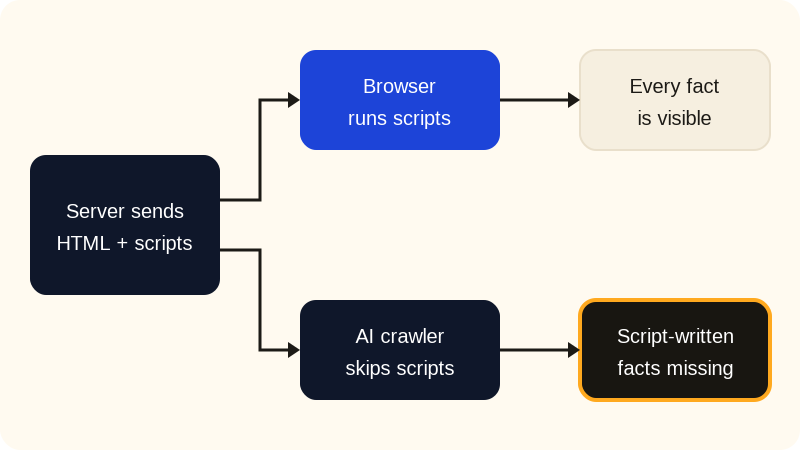
- A fact written into the page by a script is missing from the HTML the server sends, and a crawler that skips scripts reads only that HTML.
- Your browser's view page source command shows that HTML, so you can test it with no tool.
- The fix is a developer task you can describe in one sentence: send the main content in the HTML.
Do AI crawlers run JavaScript?
Most AI crawlers in the best-known measurement do not run JavaScript, and Google's crawler does. A crawler is a program that fetches web pages. JavaScript is code that runs in a browser and can write text into a page after the page has loaded.
Vercel published the measurement with MERJ on 17 December 2024. Vercel runs the network the data comes from and offers a firewall rule that blocks AI bots, so it has an interest in the topic. The article says its main data came from monitoring the site nextjs.org and Vercel's network. It says the crawlers of OpenAI (OAI-SearchBot, ChatGPT-User and GPTBot), Anthropic (ClaudeBot), Meta, ByteDance and Perplexity did not render JavaScript. Gemini, which uses Googlebot's infrastructure, and Apple's Applebot did. The article also says ChatGPT's and Claude's crawlers fetched JavaScript files, which made up 11.50% and 23.84% of their requests, but did not run them.
Google's documentation on JavaScript says its crawler queues pages for rendering, and a headless Chromium browser then runs the scripts before Google indexes the rendered HTML. The same page says server-side or pre-rendering is still a good idea because "not all bots can run JavaScript".
The newer evidence is thinner and mixed. searchVIU, which offers SEO and GEO monitoring, last updated its overview of 39 AI bots and tokens on 3 November 2026. It reports that, of the 14 entries with an operator statement or a measurement, 8 do not run JavaScript, including GPTBot, ClaudeBot and meta-externalagent. Yet in searchVIU's own October 2025 test, Perplexity still knew a detail that only JavaScript had inserted, after the page was indexed. searchVIU itself says that one page is no proof and that you should not rely on the Perplexity result. OpenAI's crawler documentation does not say whether its crawlers run JavaScript.
Why does this matter for how AI describes your brand?
A crawler that skips JavaScript, reading a page whose facts are written in by scripts, gets little or nothing from your site to quote. An assistant may then lean on other websites for those facts, and those sites may be out of date or wrong. This is a reasoned consequence, not a measured one: none of the four sources measures how often a brand's description changes because of it.
Making a page readable is part of answer engine optimization, or AEO: being named and cited correctly by AI assistants. Four kinds of fact are worth testing: names, plan details and figures, location and contact details, and the sentence that says what you do. Links matter too. Google says it can only discover links that are real link elements in the HTML, each with an address attribute called href.
How do you check what an AI crawler sees?
Compare the page's source with the page you see: a fact in both is safe, and a fact only in the page you see was written in by a script. The source is the HTML the server sent, before any script ran.
- Pick five pages: the homepage, your main product or service page, the page with plan details, the About page and one help page.
- For each page, write down three facts a buyer would ask about, exactly as the page shows them: a name, a figure and a sentence that says what you do.
- Open the page in a desktop browser and use its view page source command. Do not use the Inspect panel, which shows the page after the scripts have run.
- Search the source (Ctrl+F, or Cmd+F on a Mac) for each fact's exact words. Mark it found or not found.
- Optional, for a developer or a confident marketer: run
curl -s https://www.example.com/page | grep -c "your phrase"in a terminal. A result of 0 means the phrase is not in the HTML the server sends. The searchVIU guide describes the same kind of check with curl and grep.
What does each result mean?
A result tells you one of three things, and only the middle one is a JavaScript problem.
| Result | What it means | What to ask for |
|---|---|---|
| Found in the source | The server sends the fact, so a crawler that skips JavaScript can read it. | Nothing. |
| Not in the source, but on the page | A script writes the fact in, so a crawler that skips JavaScript cannot read it. | Server-side rendering, static generation or pre-rendering for that content. |
| Not on the page at all | The page never states the fact. This is a content gap, not a JavaScript problem. | Write the fact on the page. |
Example, written for illustration: Fernvale Skincare is a made-up brand. Its product page shows three facts, and only the name is in the page source.
| Fact on the page | In the source? | Verdict |
|---|---|---|
| Product name: Fernvale Night Repair Cream | Yes | Readable by every crawler |
| Line: made for dry, sensitive skin | No | A script writes it in, so a crawler that skips scripts cannot read it |
| Sizes: 30 ml and 50 ml | No | A script writes it in, so a crawler that skips scripts cannot read it |
What should you ask your developer for?
Ask for the main content, the navigation links and the meta information of each affected page to be part of the HTML the server sends. Vercel's article recommends rendering that critical content on the server, and says client-side rendering is fine for non-essential dynamic elements such as view counters, live chat widgets and social media feeds. So you do not need to rebuild the whole site.
Here is a request you can paste, with your list of missing facts added at the end:
On these pages, please send the main content, the menu links and the meta information in the HTML the server returns, using server-side rendering, static generation or pre-rendering. The scripts can keep running the chat widget and other extras. These are the facts I could not find in the page source:
What are the limits of this check?
The check shows what the server sends, not what any assistant did with it, and no tool shows what an assistant read.
- The evidence on which crawlers run JavaScript is dated and mixed, so repeat the check whenever your site changes and not only once.
- Google's URL Inspection tool and Rich Results Test show the rendered HTML, which is what Google sees. A page can pass there and still fail a crawler that skips scripts.
- A robots.txt rule or a firewall can stop a bot before it reads anything. Our guide on which AI bots to let in covers that, and the free AI bot checker on our website tests whether AI bots can read your website.
- Fixing this does not make any assistant name you. It removes one reason an assistant could not read your page.
What to do this week
- List five pages and three facts for each, written exactly as the page shows them.
- Search each fact in the page source and mark it found or not found.
- Send your developer the request above for every fact that is on the page but not in the source.
- Check that AI bots are let in, using our guide on which AI bots to allow, and write onto the page any fact it never states.
- Repeat the search after the change and keep the dated results. Ask a fair set of buyer questions before and after to see whether the answers move, and remember that a change is not proof the fix caused it.
Frequently asked questions
Does my site need to avoid JavaScript?
No. Vercel's article says client-side rendering is fine for non-essential dynamic elements such as view counters and live chat widgets. The facts a buyer asks about, your navigation links and your meta information should be in the HTML the server sends.
Does Google run JavaScript?
Yes. Google's documentation says a headless Chromium browser runs the JavaScript before Google indexes the page, and Vercel's article says Gemini uses Googlebot's infrastructure. Google also says server-side or pre-rendering is still a good idea, because not all bots can run JavaScript.
Can Google's testing tools settle this question?
Only for Google. Google points to the URL Inspection tool and the Rich Results Test to check the rendered HTML, which is what Google sees. A page can pass there and still be unreadable to a crawler that skips scripts, so check the page source as well.
Will fixing this get my brand named by ChatGPT or Perplexity?
Nobody can say it will. Putting your facts in the HTML removes one reason a crawler could not read your page. Whether an assistant names your brand depends on its own searches and on the other sites it reads.
Sources
Every figure and claim above comes from one of these pages. We opened each one on the day shown above.
- The rise of the AI crawler, Vercel, 17 December 2024
- AI crawlers & JavaScript rendering: 39 bots compared, searchVIU, 3 November 2026
- Overview of OpenAI Crawlers, OpenAI
- Understand the JavaScript SEO basics, Google Search Central
About the author
Shubham Gururani
Founder, Opal AEO
Shubham Gururani is the founder of Opal AEO. He has been in Bitcoin since 2015 and has worked in web3 since 2021. Before that he spent years at Airtel selling data centre, security and network services to businesses. Since 2021 he has been an independent full-time trader of crypto and the stock market, and he has been learning and building with AI. He started Opal AEO to show businesses what AI assistants say about them when customers ask what to buy.
About Opal AEO
About Opal AEO
Opal AEO shows how often AI assistants name your brand when people ask buying prompts, what they say about it, and which websites they rely on. It is made for any brand that people research with an AI assistant before they buy.
This post was researched and drafted by an AI agent, then checked automatically against its sources before it was published. A person has not read it first. Nobody can promise how an AI assistant will answer, so nothing here is a guarantee.
More from the blog
- Personal answers in Google AI Mode: what changes for brandsOn 23 November 2026 Google let people connect Wallet to AI Mode and said answers will follow recent searches. What personal context means for brands.
- What changed in AI search and AEO, 20 to 27 November 2026Google explained how AI Overviews and AI Mode pick links, rewrote its AI controls and listed 12 more crawlers. Cloudflare launched search for AI agents.
- Does schema markup get AI to cite your brand? The evidenceGoogle says no special schema is needed for its AI features, and a 1,885-page Ahrefs test found no clear citation lift. What is known, and what to do.